Webhook Integration Documentation
Overview
This feature allows you to configure a webhook endpoint to receive activity data events. Once configured, Corsano will deliver real‑time data payloads to your specified endpoint.
:::info To be added
These events will be added to the webhook in a future release:
- Patient Creation events
- AF (atrial fibrillation) alerts
- Core events and trending alert events
:::
Gather Your Connection Details
The following details are typically required before enabling the webhook:
- Endpoint URL: Public, valid
https://address you control. - Verification secret: Shared secret for HMAC signature validation.
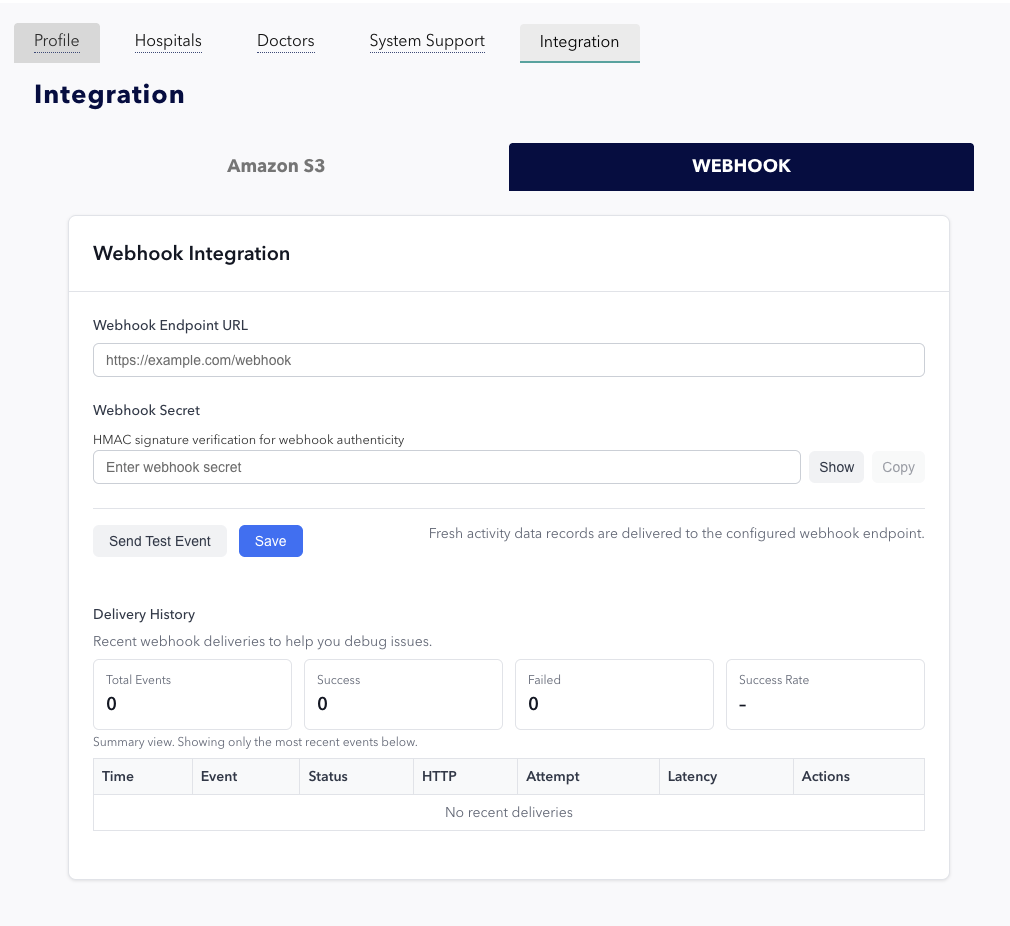
You can apply these details by locaing to the Setting page, open the Integration tab and click WEBHOOK. You will see the following page:
Test and Save Webhook configuration
You can trigger a test event by clicking the "Send Test Event" button. This will dispatch a payload containing { event_type: "test" } to the configured endpoint. Verify on your system that the event has been received and processed as expected.
Click the "Save" button to persist the endpoint configuration and secret.
Toggle Webhook for Each Study

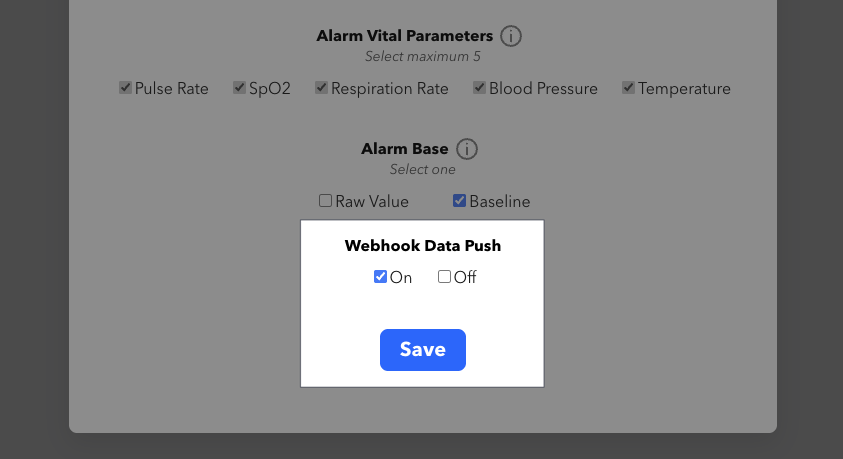
In the settings modal for each study, you can enable or disable the webhook. When Webhook Data Push is disabled, no data associated with that study will be forwarded.
Delivery History
Displays recent webhook delivery attempts for debugging.
Metrics
- Total Events: Number of webhook events attempted.
- Success: Number of successful deliveries.
- Failed: Number of failed attempts. Full logs for failed requests will be displayed.
- Success Rate: Ratio of successes to total attempts.
Event Log Table
Each entry includes:
- Time: When delivery occurred.
- Event: Event type.
- HTTP: Response code from your server.
- Attempt: Number of times the webhook was sent.
Delivery Workflow
The Corsano bracelet constantly streams data to the mobile app, the app forwards it to our cloud service, and as soon as the cloud receives the it, it will forward the data to your service.
Recommendations
-
Corsano sends data using the
application/jsonformat, so ensure your endpoint validates the corresponding Content-Type header. -
Return a
200or204status code only after the payload has been successfully processed. These status codes indicate that the data was delivered and handled correctly. -
Return a
4xxor5xxstatus code to signal a processing failure on your server. -
Monitor the failure count to identify connectivity issues or endpoint-side errors.
Troubleshooting
- No deliveries shown: Ensure endpoint and secret are saved.
- Consistent failures: Check network availability and endpoint logs.
- Signature mismatch: Verify that your HMAC logic uses the exact secret and payload.
Example Payload
{
    "user_uuid": "e962******2c5c",
    "data": [
        [
            {
                "timestamp": "1763562121000",
                "bpm": "79",
                "bpm_q": "2",
                "last_steps": "0",
                "activity_type": "7",
                "activity_count": "25",
                "spo2": "0",
                "spo2_q": "0",
                "energy_exp": "1196",
                "respiration_rate": "22",
                "pha": "10",
                "pha_q": "10",
                "resp_q": "1",
                "wearing": "4",
                "battery": "37",
                "gait_asymmetry": "0",
                "gait_speed": "0",
                "gait_var": "0",
                "cardiac_arrest": "1",
                "nibp_systolic": "0",
                "nibp_diastolic": "0",
                "nibp_systolic_long_term": "0",
                "nibp_diastolic_long_term": "0",
                "nibp_systolic_combine": "0",
                "nibp_diastolic_combine": "0",
                "is_charging": "0",
                "timezone": "+01:00"
            },
            {
                "timestamp": "1763562124000",
                "bpm": "0",
                "bpm_q": "0",
                "last_steps": "0",
                "activity_type": "0",
                "activity_count": "0",
                "spo2": "0",
                "spo2_q": "0",
                "energy_exp": "0",
                "pha": "0",
                "pha_q": "0",
                "resp_q": "0",
                "wearing": "4",
                "battery": "37",
                "gait_asymmetry": "0",
                "gait_speed": "0",
                "gait_var": "0",
                "cardiac_arrest": "0",
                "nibp_systolic": "122",
                "nibp_diastolic": "72",
                "nibp_systolic_long_term": "120",
                "nibp_diastolic_long_term": "57",
                "nibp_systolic_combine": "121",
                "nibp_diastolic_combine": "64",
                "is_charging": "0",
                "timezone": "+01:00"
            }
        ]
    ]
}
Data Dictionary
Activity event
Top-Level
| Field | Type | Required | Description |
|---|---|---|---|
study | string | yes | Study identifier. |
type | string | yes | Event type. Expected: "activity". |
data | object | yes | Contains user identifier + activity samples. |
data Object
| Field | Type | Required | Description |
|---|---|---|---|
user_uuid | string (UUID) | yes | Unique ID for the user. |
data | array | yes | Array of sessions/batches. Each item is an array of samples. |
Activity Sample
| Field | Type | Required | Meaning |
|---|---|---|---|
timestamp | number | yes | Unix ms. |
bpm | number | yes | Heart rate. |
bpm_q | number | yes | Heart rate quality (0–4). |
last_steps | number | yes | Step count since last sample. |
activity_type | number | yes | Activity code. |
activity_count | number | yes | Activity intensity. |
spo2 | number | yes | SpO2 (%) or 0 if invalid. |
spo2_q | number | yes | SpO2 quality (0–4, 103, 104, 105). |
energy_exp | number | yes | Energy expenditure (device-specific units). |
respiration_rate | number | yes | Respiration rate per minute. |
resp_q | number | yes | Respiration quality. |
pha | number | yes | PHA value. |
pha_q | number | yes | PHA quality. |
wearing | number | yes | Wearing state (0:not wearing, 1–3:reserved, 4:wearing for sure). |
battery | number | yes | Battery percentage. |
gait_asymmetry | number | yes | Asymmetry score. |
gait_speed | number | yes | Speed. |
gait_var | number | yes | Variability. |
cardiac_arrest | number | yes | 0/1/2. |
nibp_systolic | number | yes | Systolic blood pressure. |
nibp_diastolic | number | yes | Diastolic blood pressure. |
nibp_systolic_long_term | number | yes | Long-term systolic blood pressure. |
nibp_diastolic_long_term | number | yes | Long-term diastolic blood pressure. |
nibp_systolic_combine | number | yes | Combined systolic blood pressure. |
nibp_diastolic_combine | number | yes | Combined diastolic blood pressure. |
is_charging | boolean | yes | Charging flag. |
timezone | string | yes | ISO-8601 offset (e.g. +01:00). |
skin_proximity | number | optional | Present on iOS; Android may omits it. |
speed | number | optional | Present on iOS; Android may omits it. |
Temperature event
Top-level
| Field | Type | Required | Notes |
|---|---|---|---|
study | string | yes | e.g., "EZTJD" |
type | string | yes | must be "temperature" |
data | object | yes | container |
Data Object
| Field | Type | Required |
|---|---|---|
user_uuid | string (UUID) | yes |
data | array | yes — array of batches (each batch = array of temperature samples) |
Temperature Data
| Field | Type | Required | Meaning |
|---|---|---|---|
timestamp | number | yes | Unix ms |
temp_sk1 | number | yes | Core body temp |
temp_sk2 | number or null | no | Skin temperature during sleep |
temp_amb | number or null | no | Reserved |
timezone | string | yes | ISO-8601 offset (+01:00) |
Please note that the webhook functionality is still under active development; contact devsupport@corsano.com if you encounter any technical issues or unexpected behavior.